If Google has flagged your website for malware or unsafe content, don’t worry; you can get the warning removed.
Before you request a review from Google, make absolutely sure your site is 100% clean, because Google reviews every request manually.
If you submit too many requests while your website is still infected, Google may label you as a Repeat Offender, and then you will be blocked from submitting a new review for 30 days.
Step 1: Make Sure Your Website Is Clean
Use your security plugin or service (MalCare) to completely clean your website.
Make sure:
No malware files remain
All URLs load correctly
No unwanted redirects or pop-ups appear
Google Safe Browsing no longer shows new threats
Once you're confident the site is clean, move on to the next step.
Step 2: Submit a Review Request to Google
Follow these steps:
1. Go to your Google Search Console account
2. Click on “Security Issues” (left sidebar)
Google will show any malware warnings, hacked content, or suspicious files.
3. Scroll to the bottom and click “Request a Review”
This button only appears if Google still detects issues.
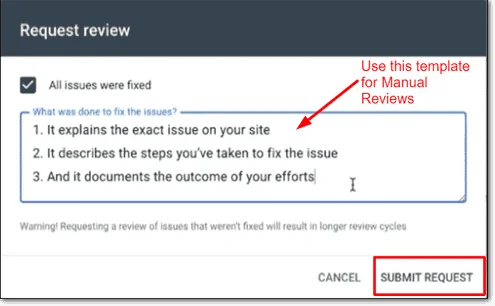
4. Fill out the review form
Google wants you to explain:
What was the issue?
How did you fix it?
How do you prevent it from happening again?
You can keep it simple, for example:
“Malware files were removed from the site. The plugin/theme causing the issue was updated and security measures were added. The website is now clean.”
5. Submit the request
After you submit, Google will manually review your site.
⏳ How long does it take?
Usually 24–72 hours, but sometimes longer. There’s no way to speed this up; Google completes all reviews manually.
Once approved, the warning will disappear automatically from your site and search results.
Was this article helpful?
That’s Great!
Thank you for your feedback
Sorry! We couldn't be helpful
Thank you for your feedback
Feedback sent
We appreciate your effort and will try to fix the article